Broadcasting
Broadcasting is one of those ideas that looks like a shape trick until you understand what the tensor library is actually doing.
At the Python level, broadcasting means:
x = torch.randn(4, 3)
b = torch.randn(3)
y = x + b
and PyTorch behaves as if b had shape (4, 3).
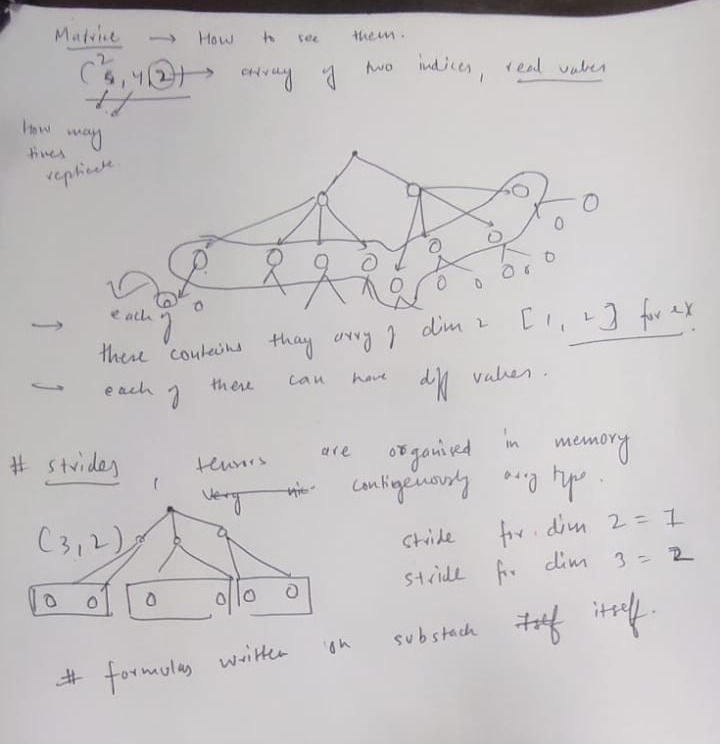
But the important part is this: PyTorch usually does not copy b four times. It creates a view whose metadata says, "when the row index changes, keep reading from the same memory."
That is the core idea:
Broadcasting is mostly shape metadata plus stride tricks. The data is not stretched. The pointer arithmetic changes.
To understand broadcasting properly, you need three things:
- shape
- storage
- stride
Once those are clear, expand, repeat, view, reshape, transpose, and batched matmul all become much less magical.
Shape, Storage, and Stride
A tensor has a logical shape, but its values live in a flat storage buffer.
Suppose:
import torch
a = torch.tensor([
[10, 11, 12],
[20, 21, 22],
])
print(a.shape) # torch.Size([2, 3])
print(a.stride()) # (3, 1)
Logically, a is:
shape = (2, 3)
row 0: 10 11 12
row 1: 20 21 22
Physically, the values are stored as one flat buffer:
storage index: 0 1 2 3 4 5
value: 10 11 12 20 21 22
The stride tells PyTorch how many storage positions to jump when an index changes by 1 along a dimension.
For a:
shape = (2, 3)
stride = (3, 1)
That means:
- moving down one row jumps by 3 elements
- moving right one column jumps by 1 element
The general offset formula is:
where is the stride for dimension .
For the matrix above:
So:
a[0, 0] -> offset 3*0 + 0 = 0 -> 10
a[0, 2] -> offset 3*0 + 2 = 2 -> 12
a[1, 0] -> offset 3*1 + 0 = 3 -> 20
a[1, 2] -> offset 3*1 + 2 = 5 -> 22
Contiguous Strides
For a normal row-major contiguous tensor with shape:
the last dimension moves fastest, so:
and for any earlier dimension:
Example:
x = torch.empty(2, 3, 4)
print(x.stride()) # (12, 4, 1)
Why?
shape = (2, 3, 4)
stride = (3*4, 4, 1)
= (12, 4, 1)
The offset formula is:
This is what "contiguous" means: the logical traversal order matches the physical memory order.
Transpose: Same Storage, Different Stride
Now transpose the matrix:
a = torch.arange(6).reshape(2, 3)
b = a.t()
print(a)
print(a.shape, a.stride()) # torch.Size([2, 3]) (3, 1)
print(b)
print(b.shape, b.stride()) # torch.Size([3, 2]) (1, 3)
a is:
logical a, shape (2, 3), stride (3, 1)
0 1 2
3 4 5
b = a.t() is:
logical b, shape (3, 2), stride (1, 3)
0 3
1 4
2 5
The storage did not move:
storage index: 0 1 2 3 4 5
value: 0 1 2 3 4 5
Only the metadata changed.
For b, the offset formula is:
So:
b[0, 0] -> offset 0 + 3*0 = 0 -> 0
b[0, 1] -> offset 0 + 3*1 = 3 -> 3
b[1, 0] -> offset 1 + 3*0 = 1 -> 1
b[2, 1] -> offset 2 + 3*1 = 5 -> 5
This is why b is usually non-contiguous. Iterating across the second axis now jumps by 3 in storage.
print(a.is_contiguous()) # True
print(b.is_contiguous()) # False
Some operations can work with non-contiguous tensors. Others need contiguous memory. For example:
b.view(6) # often fails
b.reshape(6) # works, may copy
b.contiguous() # explicitly makes a contiguous copy
The short version:
viewchanges shape metadata only, so it needs compatible stridesreshapechanges shape if possible, otherwise copiescontiguouscopies data into standard row-major layout
Broadcasting Rules
Broadcasting compares shapes from right to left.
Two dimensions are compatible if:
- they are equal, or
- one of them is
1, or - one of them does not exist
The result dimension is the maximum of the two dimensions.
Example:
(4, 3)
+ (3)
---------
(4, 3)
The missing leading dimension in (3,) behaves like 1:
(4, 3)
+ (1, 3)
---------
(4, 3)
Another example:
(10, 1, 3, 4)
+ (20, 3, 1)
------------------
(10,20, 3, 4)
Aligned right:
10 1 3 4
20 3 1
------------------
10 20 3 4
Compatibility check:
dim -1: 4 vs 1 -> 4
dim -2: 3 vs 3 -> 3
dim -3: 1 vs 20 -> 20
dim -4: 10 vs missing -> 10
A failing example:
(5, 6)
target idea: (5, 6, 10)
If you try to combine (5, 6) with (5, 6, 10), PyTorch aligns from the right:
target: 5 6 10
input: 5 6
The last dimensions are 10 and 6, so this fails.
If you actually mean "add a singleton dimension at the end," you need:
x = torch.randn(5, 6)
x = x.unsqueeze(-1) # shape (5, 6, 1)
Now:
target: 5 6 10
input: 5 6 1
That broadcasts successfully.
Broadcasting as Stride 0
Here is the key example.
v = torch.tensor([[10, 20, 30]])
print(v.shape, v.stride()) # torch.Size([1, 3]) (3, 1)
e = v.expand(4, 3)
print(e.shape, e.stride()) # torch.Size([4, 3]) (0, 1)
Logical view:
e, shape (4, 3)
10 20 30
10 20 30
10 20 30
10 20 30
Physical storage is still just:
storage index: 0 1 2
value: 10 20 30
The expanded tensor has stride (0, 1).
Its offset formula is:
So all rows point to the same storage:
e[0, 0] -> offset 0*0 + 0 = 0 -> 10
e[1, 0] -> offset 0*1 + 0 = 0 -> 10
e[2, 0] -> offset 0*2 + 0 = 0 -> 10
e[3, 0] -> offset 0*3 + 0 = 0 -> 10
e[0, 2] -> offset 0*0 + 2 = 2 -> 30
e[3, 2] -> offset 0*3 + 2 = 2 -> 30
That is the whole trick.
Stride 0 means:
moving along this dimension does not move the memory pointer.
Memory diagram:
logical expanded tensor:
col0 col1 col2
row0 storage[0] storage[1] storage[2]
row1 storage[0] storage[1] storage[2]
row2 storage[0] storage[1] storage[2]
row3 storage[0] storage[1] storage[2]
actual storage:
storage[0] = 10
storage[1] = 20
storage[2] = 30
It looks like 12 numbers, but there are only 3 stored numbers.
expand vs repeat
expand creates a view. repeat creates a copy.
v = torch.tensor([[10, 20, 30]])
e = v.expand(4, 3)
r = v.repeat(4, 1)
print(e.shape, e.stride()) # torch.Size([4, 3]) (0, 1)
print(r.shape, r.stride()) # torch.Size([4, 3]) (3, 1)
Conceptually:
v storage:
10 20 30
expand(4, 3) storage:
10 20 30
repeat(4, 1) storage:
10 20 30 10 20 30 10 20 30 10 20 30
So:
expandis cheap in memoryrepeatuses more memoryexpandcan only expand dimensions of size1repeatcan tile any dimension because it physically copies
The difference matters a lot for large tensors.
x = torch.randn(1, 4096)
expanded = x.expand(8192, 4096)
repeated = x.repeat(8192, 1)
print(expanded.storage().size()) # roughly 4096 elements
print(repeated.storage().size()) # roughly 8192 * 4096 elements
The exact storage API has changed across PyTorch versions, but the idea is stable: expand shares storage, repeat allocates.
A safer modern check:
print(expanded.untyped_storage().nbytes())
print(repeated.untyped_storage().nbytes())
Why You Should Be Careful Writing to Expanded Tensors
Because expanded dimensions may point multiple logical elements at the same memory, in-place writes can be ambiguous.
v = torch.tensor([[10., 20., 30.]])
e = v.expand(4, 3)
e.add_(1)
PyTorch will usually reject operations like this because multiple elements alias the same storage location.
The problem is:
e[0, 0], e[1, 0], e[2, 0], e[3, 0]
all refer to the same underlying value.
If you need independent writable data, use:
e = v.expand(4, 3).clone()
or:
r = v.repeat(4, 1)
Use expand when you want virtual broadcasting. Use repeat when you genuinely need physical copies.
Broadcasting in Elementwise Operations
Elementwise operations use broadcasting directly.
x = torch.arange(12).reshape(4, 3)
b = torch.tensor([100, 200, 300])
y = x + b
print(y)
Shapes:
x: (4, 3)
b: (3)
y: (4, 3)
Equivalent mental model:
y = x + b.expand(4, 3)
But you usually do not write the expand yourself because PyTorch does it inside the operation.
Formula:
Since b has no row dimension, its row stride is effectively 0.
Another common pattern is adding per-channel values to image batches.
images = torch.randn(32, 3, 224, 224) # N, C, H, W
mean = torch.tensor([0.485, 0.456, 0.406])
std = torch.tensor([0.229, 0.224, 0.225])
normalized = (images - mean[None, :, None, None]) / std[None, :, None, None]
Shapes:
images: (32, 3, 224, 224)
mean: ( 1, 3, 1, 1)
std: ( 1, 3, 1, 1)
result: (32, 3, 224, 224)
The formula is:
The same channel mean is reused for every batch item and every spatial position.
None, unsqueeze, and Shape Alignment
Broadcasting works from the right, so sometimes you must insert dimensions explicitly.
These two are equivalent:
x = torch.randn(5, 6)
a = x.unsqueeze(-1) # (5, 6, 1)
b = x[:, :, None] # (5, 6, 1)
Useful patterns:
v = torch.randn(3)
v[None, :] # (1, 3), row vector
v[:, None] # (3, 1), column vector
Outer sum:
a = torch.tensor([10, 20, 30]) # (3,)
b = torch.tensor([1, 2, 3, 4]) # (4,)
out = a[:, None] + b[None, :]
print(out.shape) # (3, 4)
Formula:
Memory view:
a[:, None] has shape (3, 1)
10
20
30
b[None, :] has shape (1, 4)
1 2 3 4
result shape (3, 4)
11 12 13 14
21 22 23 24
31 32 33 34
This is not a special "outer" operator. It is just broadcasting.
Broadcasting Is Not Matrix Multiplication
Elementwise multiplication and matrix multiplication use different rules.
Elementwise Product
Elementwise multiplication uses broadcasting.
a = torch.randn(3, 4)
b = torch.randn(4)
c = a * b
print(c.shape) # (3, 4)
Formula:
The shapes align as:
a: (3, 4)
b: (4)
c: (3, 4)
But:
a = torch.randn(3, 4)
b = torch.randn(4, 5)
a * b
fails because:
(3, 4)
(4, 5)
Rightmost dimensions 4 and 5 are incompatible.
Matrix Product
Matrix multiplication is linear algebra, not elementwise broadcasting.
a = torch.randn(3, 4)
b = torch.randn(4, 5)
c = a @ b
print(c.shape) # (3, 5)
Formula:
For torch.matmul, the last two dimensions are matrix dimensions:
a: (..., n, k)
b: (..., k, m)
out: (..., n, m)
The inner dimension k must match.
The leading dimensions are batch dimensions and are broadcast.
Example:
a = torch.randn(10, 1, 3, 4)
b = torch.randn(1, 20, 4, 5)
c = a @ b
print(c.shape) # (10, 20, 3, 5)
Break it into two parts:
matrix core:
(3, 4) @ (4, 5) -> (3, 5)
batch dims:
(10, 1) and (1, 20) -> (10, 20)
final:
(10, 20, 3, 5)
Formula:
More carefully, because broadcasting reuses the singleton dimensions:
The batch dimensions broadcast, but the matrix multiplication still sums over the inner dimension.
Vector Cases in matmul
torch.matmul has special rules for 1D tensors.
Vector @ Matrix
v = torch.randn(4)
m = torch.randn(4, 5)
out = v @ m
print(out.shape) # (5,)
PyTorch internally treats the vector as (1, 4):
(4,) @ (4, 5)
becomes
(1, 4) @ (4, 5) -> (1, 5)
then squeeze -> (5,)
Formula:
Matrix @ Vector
m = torch.randn(3, 4)
v = torch.randn(4)
out = m @ v
print(out.shape) # (3,)
PyTorch internally treats the vector as (4, 1):
(3, 4) @ (4,)
becomes
(3, 4) @ (4, 1) -> (3, 1)
then squeeze -> (3,)
Formula:
Common PyTorch Shape Tools
Broadcasting is automatic shape compatibility. These tools let you control the geometry manually.
unsqueeze
Adds a dimension of size 1.
x = torch.randn(3)
print(x.unsqueeze(0).shape) # (1, 3)
print(x.unsqueeze(1).shape) # (3, 1)
This is metadata-only.
squeeze
Removes dimensions of size 1.
x = torch.randn(1, 3, 1, 5)
print(x.squeeze().shape) # (3, 5)
print(x.squeeze(0).shape) # (3, 1, 5)
Be careful with bare squeeze() in model code. If your batch size is 1, it can accidentally remove the batch dimension.
permute
Reorders axes.
x = torch.randn(2, 3, 4)
y = x.permute(2, 0, 1)
print(y.shape) # (4, 2, 3)
print(y.stride())
permute usually changes strides without copying data. The result is often non-contiguous.
view
Changes shape without copying, but only when the current strides permit it.
x = torch.arange(12).reshape(3, 4)
y = x.view(2, 6)
After a transpose or permute:
x = torch.arange(12).reshape(3, 4)
t = x.t()
t.view(12) # likely fails
because t is non-contiguous.
reshape
Like view, except it may copy if needed.
z = t.reshape(12)
This is convenient, but remember: if it must copy, it costs memory and time.
expand
Expands size-1 dimensions by using stride 0.
x = torch.randn(1, 3, 1)
y = x.expand(5, 3, 7)
print(y.shape) # (5, 3, 7)
print(y.stride())
Only dimensions of size 1 can be expanded to larger sizes.
repeat
Tiles data physically.
x = torch.tensor([[1, 2, 3]])
y = x.repeat(4, 1)
print(y)
Use this when you need real independent copies.
A Practical Debugging Checklist
When a broadcasting error happens, do this:
- Write both shapes vertically.
- Align them from the right.
- Compare each column.
- A column is valid if the sizes are equal, one is
1, or one is missing. - Insert
None/unsqueezewhere your intended singleton dimension is missing.
Example:
x = torch.randn(5, 6)
w = torch.randn(10)
x + w
Alignment:
x: 5 6
w: 10
6 vs 10 fails.
If you wanted (5, 6, 10), write:
x3 = x[:, :, None] # (5, 6, 1)
w3 = w[None, None, :] # (1, 1, 10)
y = x3 + w3
print(y.shape) # (5, 6, 10)
Alignment:
x3: 5 6 1
w3: 1 1 10
--------------
y: 5 6 10
Formula:
The Mental Model
A tensor is not just a block of numbers. A tensor is:
storage pointer + shape + stride + storage offset + dtype + device
Broadcasting mostly changes shape and stride.
The most important stride trick is:
stride 0 = reuse the same memory location along this axis
So when you see:
x = torch.randn(1, 3)
y = x.expand(4, 3)
read it as:
make a logical (4, 3) tensor,
but when the row index changes,
do not move the pointer.
That is why broadcasting is fast, why expand is memory-cheap, why in-place writes on expanded views are dangerous, and why repeat is a completely different operation.
Once you think in shape + stride, broadcasting stops being magic. It becomes pointer arithmetic with a very nice interface.